
A used car inspection report before you buy
Work through checks by area and record what is satisfactory, what needs attention and what could not be checked. The buyer receives a PDF with the findings and the questions still open.
A better-informed purchase starts with documented observations and explicit inspection limits.
Fictional data · demonstration example
OBDAuto · Complete example
Pre-purchase inspection
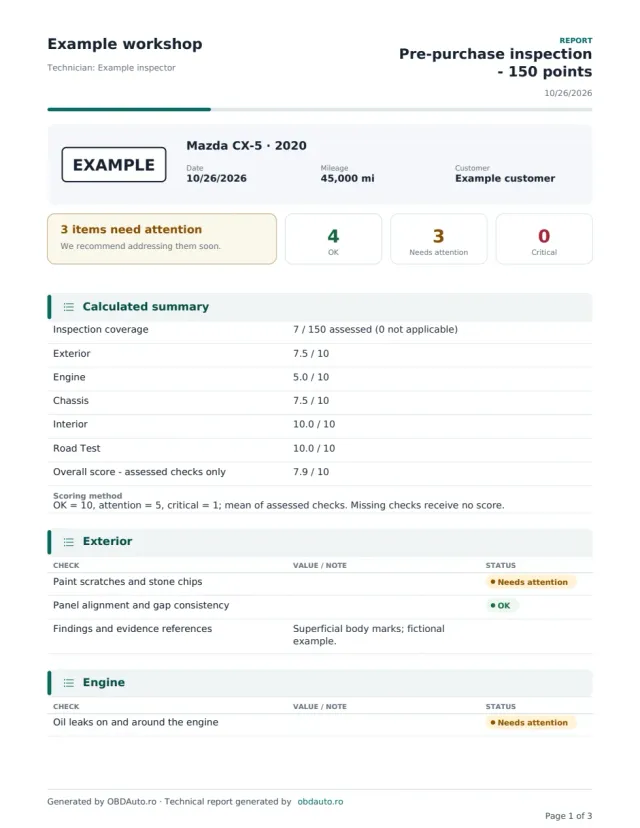
Mazda CX-5 · 2020 · EXAMPLE
See the exact document you can generate: vehicle details, findings and the sections specific to this report type.
- Inspection coverage
- 7 / 150 assessed (0 not applicable)
- Exterior
- 7.5 / 10
- Engine
- 5.0 / 10
- 3 pages · actual PDF format
- Photos, findings and recommendations
- The same content as in the app
DEMO · Fictional data and illustrative photos.
What it solves in the workshop
Checks grouped by area
Exterior, engine bay, running gear, interior and road test have separate inspection points.
Findings beyond ticks
Add explanations and photographs for items that need attention.
Unchecked items stay visible
Record restricted access and incomplete checks without presenting the inspection as a vehicle guarantee.
What the report includes
- Inspection points for the exterior and engine bay.
- Observations about brakes, running gear and interior.
- Recorded road-test results, when a test is performed.
- Status of each checked item, photographs and section notes.
- Conclusions and recommendations for investigation before purchase.
Fictional data · demonstration example
Pre-purchase inspection
- Reference
- DEMO-1042
- Vehicle
- Mazda CX-5 · 2020
- Exterior
- Superficial marks · attention
- Engine bay
- Oil traces · attention
- Brake pads
- Further assessment needed
- Road-test brake response
- OK during recorded check
Recorded finding
Fictional example: oil traces and brake pads needing further assessment were observed; the source of the oil traces has not been established.
Recommended next step
Ask for the leak source to be identified and the pads measured before negotiating the required work.
The inspection describes observed condition and is not a vehicle certification or commercial warranty.
How to complete the report
- Confirm the vehicle identity and inspection conditions, including available access and road-test permission.
- Complete the areas inspected and explicitly mark unchecked items and findings needing attention.
- Review the findings with the buyer and generate the PDF with recommended next steps.
Questions about this report
Does the report guarantee there are no hidden defects?
No. It describes observations at the inspection date and the checks recorded. Hidden or intermittent faults may require dismantling or further investigation.
Must every item be ticked before I issue the report?
Record only checks performed and keep unchecked items visible. A blank field is not evidence that an item is satisfactory.
Does it automatically include accident and mileage history?
Do not assume this checklist supplies a complete history. Available documents and external sources need separate verification and their limitations should be recorded.
Can I add my workshop logo and colours to the report?
Yes, on paid reports: choose the style (modern, classic for print, your workshop colour, minimalist, premium or sport), the colour, header details, your own numbering, the technician signature and stamp, plus a message, terms and IBAN. Free reports use the standard OBDAuto design.
Open the form with this report type already selected
Sign in, fill in the vehicle details and generate the PDF with your workshop header. You can change the report type at any time in the form.
Generate your first report free