
I/M Readiness & Pre-Smog Report
Record confirmed, pending and permanent DTCs, the monitor readiness and the MIL state, then give the driver a PDF showing exactly what is still missing before the smog test.
Show the driver which monitors are still not ready before they lose an appointment at the emissions station.
Fictional data · demonstration example
OBDAuto · Complete example
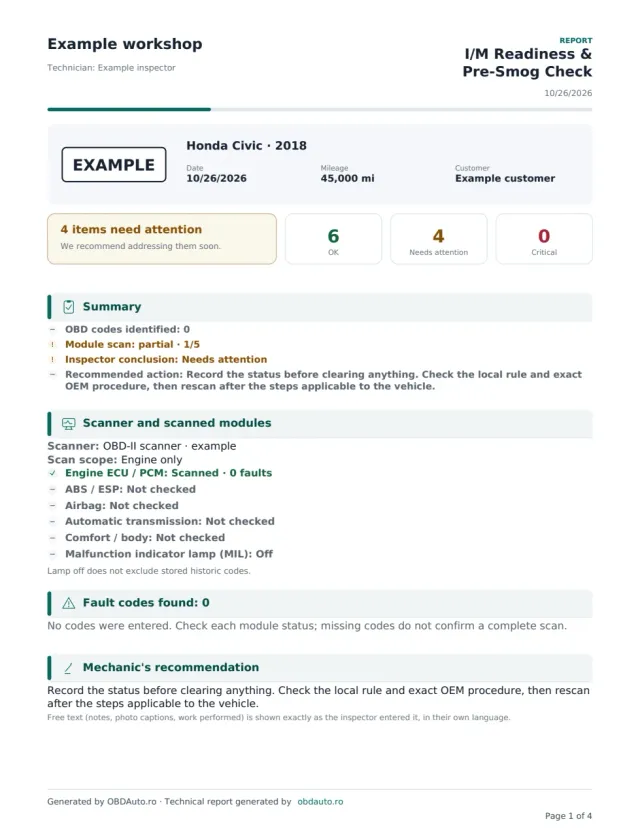
I/M Readiness
Honda Civic · 2018 · EXAMPLE
See the exact document you can generate: vehicle details, findings and the sections specific to this report type.
- Recorded monitors
- 6 ready · 2 not ready · 3 unsupported · 0 unknown / not recorded
- Preliminary forecast
- Monitors not ready — check jurisdiction requirements
- Official inspection eligibility
- Not evaluated — verify local rules and vehicle exceptions
- 4 pages · actual PDF format
- Photos, findings and recommendations
- The same content as in the app
DEMO · Fictional data and illustrative photos.
What it solves in the workshop
“Not ready” monitors, not guesses
Every monitor is recorded separately with the state read from the scan tool, not recalled from memory.
Permanent codes handled separately
Confirmed, pending and permanent DTCs appear apart, because they do not clear the same way.
A plan for the next drive cycle
You record the drive cycle or repair that comes next, so the driver knows what to do before the retest.
What the report includes
- The vehicle and information recorded during the OBD scan.
- MIL status at the time of the check.
- Confirmed, pending and permanent codes recorded separately.
- Emissions monitor status: ready, not ready or unsupported.
- Findings and recommended preparation before the official test.
Fictional data · demonstration example
I/M Readiness
- Reference
- DEMO-1042
- Vehicle
- Honda Civic · 2018
- MIL status
- Off
- Confirmed DTCs
- 0
- Monitors not ready
- 2
- Catalyst monitor
- Not ready
Recorded finding
Fictional example: the MIL is off and the catalyst monitor is not ready; a different monitor is unsupported.
Recommended next step
Check local requirements and the vehicle procedure, treat unsupported monitors separately and rescan after the recommended steps.
Advisory readiness assessment. Requirements depend on the state, vehicle and emissions programme; this report does not guarantee an official test pass.
How to complete the report
- Read MIL status, codes and monitors before clearing faults or disconnecting the battery.
- Distinguish unsupported monitors from incomplete ones and check local programme requirements for the vehicle.
- Record recommended repairs or the drive cycle from applicable documentation, then recheck readiness before the test.
Questions about this report
Is an unsupported monitor the same as a monitor that is not ready?
No. Unsupported means the vehicle does not implement that monitor. Not ready means an available monitor has not completed its check. Keep these statuses separate in the report.
Can the report guarantee a smog test pass?
No. Criteria differ by state, programme, vehicle and other conditions. The report records the status read and recommended steps without replacing the official test.
Does clearing codes prepare the car for the test?
Clearing may reset some monitors, and permanent codes are not removed in the same way. Save the findings and check the manufacturer procedure before a reset; a drive cycle does not repair a fault.
Can I add my workshop logo and colours to the report?
Yes, on paid reports: choose the style (modern, classic for print, your workshop colour, minimalist, premium or sport), the colour, header details, your own numbering, the technician signature and stamp, plus a message, terms and IBAN. Free reports use the standard OBDAuto design.
Open the form with this report type already selected
Sign in, fill in the vehicle details and generate the PDF with your workshop header. You can change the report type at any time in the form.
Generate your first report free