
A fleet inspection sheet with defects to follow up
Document vehicle checks and who follows up each concern. Record defect status, responsibility and target date, keeping the context available in a PDF for the next inspection.
An observed concern needs a recorded action and a responsible person.
Fictional data · demonstration example
OBDAuto · Complete example
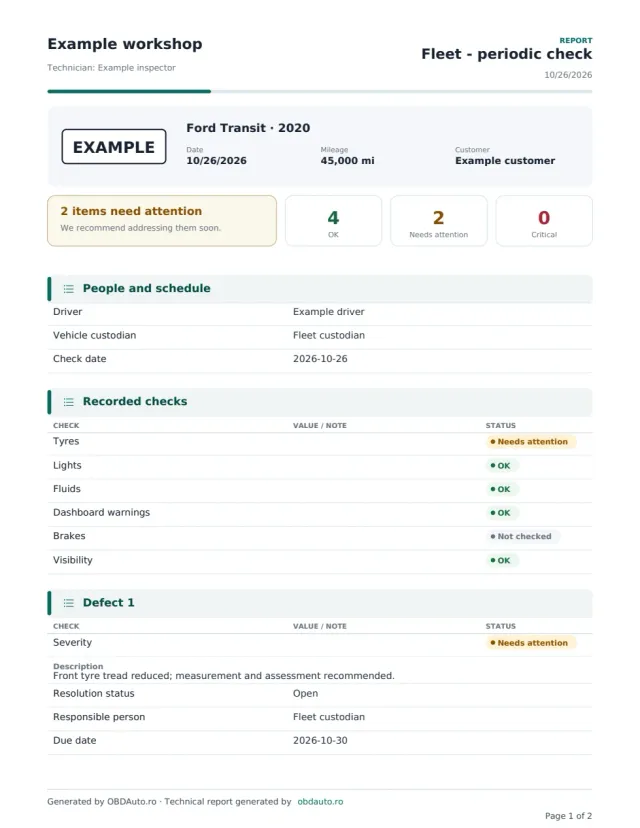
Periodic fleet inspection
Ford Transit · 2020 · EXAMPLE
See the exact document you can generate: vehicle details, findings and the sections specific to this report type.
- Driver
- Example driver
- Vehicle custodian
- Fleet custodian
- Check date
- 2026-10-26
- 2 pages · actual PDF format
- Photos, findings and recommendations
- The same content as in the app
DEMO · Fictional data and illustrative photos.
What it solves in the workshop
Consistent inspection areas
Tyres, lights, fluids, warning lamps, brakes and visibility have separate fields.
Defects with status and dates
Record severity, resolution status, responsible person and target date for each concern.
Continuity between checks
Record the resolution or reason for deferral so the next discussion starts from the previous finding.
What the report includes
- Driver, vehicle custodian and inspection date.
- Statuses for tyres, lights, fluids, warning lamps, brakes and visibility.
- Defect list with severity and resolution status.
- Responsible person and target date for each recorded defect.
- Resolution or deferral reason and the next inspection date, when entered.
Fictional data · demonstration example
Periodic fleet inspection
- Reference
- DEMO-1042
- Vehicle
- Ford Transit · 2020
- Tyres
- Needs attention
- Lights
- OK
- Defect
- Reduced front tyre tread
- Status / target date
- Open · 30 Oct 2026
Recorded finding
Fictional example: a front tyre needs tread measurement and assessment; the defect is open with a responsible person and target date.
Recommended next step
The fleet custodian arranges tyre assessment and records the result and resolution.
How to complete the report
- Identify the vehicle and people involved, then record the date and checks performed.
- Add observed defects and complete severity, responsibility, status and target date.
- Review open actions and generate the PDF for fleet records.
Questions about this report
Does the sheet automatically decide whether a vehicle can be used?
No. Inspection and vehicle-use decisions remain with responsible people, based on observed condition and applicable requirements.
Can I record a deferred concern?
Yes. Defect fields include resolution status and space for the resolution or reason for deferral. State who assessed the situation and what remains to be done.
Will the target date trigger automatic reminders?
This sheet documents the date entered. Do not assume entering a date alone activates a notification service.
Can I add my workshop logo and colours to the report?
Yes, on paid reports: choose the style (modern, classic for print, your workshop colour, minimalist, premium or sport), the colour, header details, your own numbering, the technician signature and stamp, plus a message, terms and IBAN. Free reports use the standard OBDAuto design.
Open the form with this report type already selected
Sign in, fill in the vehicle details and generate the PDF with your workshop header. You can change the report type at any time in the form.
Generate your first report free